Yes. Virtual assessments make it possible to evaluate hybrid and remote workers regardless of location. Injury Prevention Plus serves Ottawa, Gatineau, Toronto, and surrounding regions in person, and extends that reach further through virtual assessment for workers based elsewhere across Ontario and beyond.
Ergonomics for Hybrid Workers: How to Stay Comfortable Anywhere
May 20
Table of Contents
- Introduction
- Why Does Hybrid Work Create Unique Ergonomic Challenges?
- What Are the Most Common Ergonomic Problems in Home Office Setups?
- How Should Hybrid Workers Set Up Their Office Workstation?
- What Practical Changes Make the Biggest Difference in a Home Office?
- How Does Posture Change When Working From Different Locations?
- When Does a Hybrid Worker Need a Formal Ergonomic Assessment?
- Frequently Asked Questions
Introduction
Hybrid work was supposed to offer the best of both worlds by being flexible, offering autonomy, and having fewer commutes. For many workers it has delivered on that. What it hasn’t delivered, in most cases, is a consistent physical environment. And the body notices.
A Tuesday in a properly configured office followed by a Wednesday hunched over a laptop on a kitchen table isn’t a balanced arrangement. It’s two different sets of physical demands, often working against each other. The discomfort that builds in one setting doesn’t reset when the location changes. It carries over.
For hybrid workers across Ottawa, Toronto, Gatineau, and surrounding regions, this has become one of the more quietly persistent workplace health issues of the last few years. This is something an ergonomic risk assessment is built to address. First, it helps to understand what the body is dealing with when the setup it is working in keeps changing week after week.
Why Does Hybrid Work Create Unique Ergonomic Challenges?
Because the body adapts to consistency and struggles with variation it can’t control.
With a fixed setup, even a non-optimal one, the body eventually finds a way to cope. It is not ideal but it is at least consistent. Hybrid work takes that consistency away. Three days at a proper desk with a sit-stand setup and a good chair, then two days on the sofa with a laptop on the knees. The physical load is completely different in each setting and the body has to absorb that difference every single week without ever really settling.
The cumulative effect builds faster than most people expect. Neck and shoulder strain from laptop posture. Lower back discomfort from seating that wasn’t designed for a full workday. Wrist and forearm tension from trackpads used in place of a proper mouse. None of these feel serious at first. Over months, they become the kind of persistent discomfort that starts affecting concentration, output, and eventually attendance.
A proper ergonomic risk assessment follows the worker, not just the office. It looks at the most problematic environment, gets specific about what the set-up is loading, and identifies where the risk is actually coming from in each case.
What Are the Most Common Ergonomic Problems in Home Office Setups?
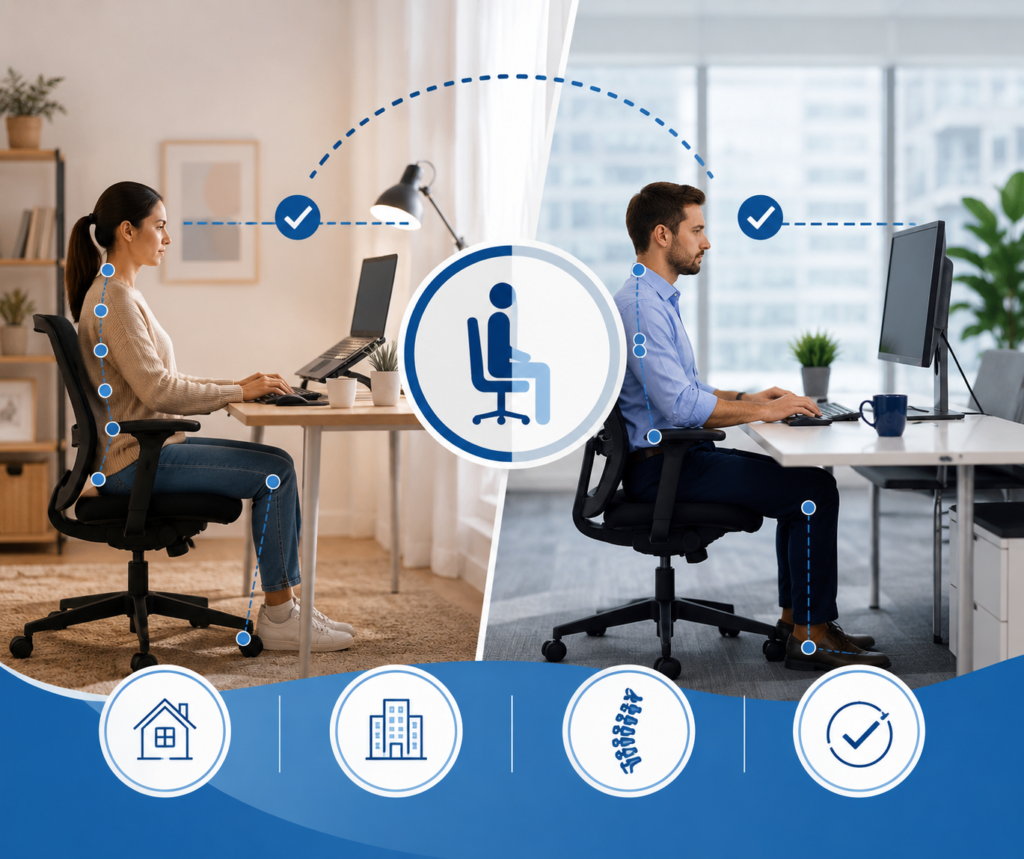
Most home offices weren’t designed, they were assembled from what was available when the need arose, and many haven’t changed much since. Across Ottawa, Gatineau, and the Greater Toronto Area, a lot of hybrid workers are still working at setups that were thrown together in the first few weeks of 2020 and have now become permanent.
The problems that show up most consistently are:
- Screens that are too low so that the head follows it forward and the cervical spine carries that load all day. The most common cause is laptop use without any elevation. A laptop flat on a desk or table puts the screen roughly 20 to 30 centimetres below where it needs to be for most workers and that gap adds up over a full day of work
- Improper seating; A kitchen chair is fine for dinner, but it is not fine for eight hours of work. There is no lumbar support, so the lower back rounds, the pelvis tilts, and the spine takes on more load than it should across a full workday.
- Keyboards and mice placed too high. Even a small amount of sustained elevation keeps the shoulders slightly elevated and the forearm muscles engaged continuously. Over a full day that adds up to significant cumulative strain.
- Poor lighting that forces workers to lean toward the screen. Glare from windows positioned behind or in front of the monitor is a common driver of forward head posture that has nothing to do with screen height.
A virtual ergonomic assessment identifies all of these specifically, for the individual worker’s antrhopometrics and home setup, and produces recommendations that can be implemented without purchasing a full office fit-out.
How Should Hybrid Workers Set Up Their Office Workstation?
Office workstations feel more stable but they still need to be set up for the person sitting in them, not left wherever the last person had it. Monitor within a comfortable viewing distance (<30” to the eyes), top of the screen at eye level, chair adjusted so the feet sit flat and the lower back is supported, desk adjusted to align with forearms with shoulders relaxed, keyboard and mouse close enough that the arms are not reaching forward.
In shared/ hoteling workstations across Ottawa, Toronto, and Gatineau this becomes a real issue, it workers are sitting down at whatever configuration the last person left and working through the day without adjusting anything. This is one of the more common ways strain builds. Taking a couple of minutes to reset the setup before starting work is worth doing every time.
An office ergonomic assessment conducted for a hybrid worker should account for shared/ hoteling set-ups, not just the assumption of a fixed assigned workstation.
What Practical Changes Make the Biggest Difference in a Home Office?
Not every home office improvement requires new furniture. Some of the highest-impact changes cost very little.
- Raising the laptop. A laptop stand or even a stable stack of books brings the screen to a usable height. Pair it with an external keyboard and mouse and the improvement in posture is immediate and significant.
- Adding lumbar support. A rolled towel or a lumbar cushion placed at the curve of the lower back makes a real difference to how the spine is loaded, especially in chairs that offer nothing in the way of support.
- Repositioning the chair relative to the desk. When the chair is too far from the desk the arms have to reach further than they should and the shoulders feel it over time. Pulling in closer so the keyboard sits within easy reach is one of the simpler fixes and it does not require any new equipment to work.
- Managing screen glare. A window sitting directly in front or behind a worker is one of the more common drivers of forward posture and it has nothing to do with screen height or chair setup. Repositioning the desk so the light comes from the side fixes it. That is the kind of thing a proper assessment picks up and it is usually just the starting point.
These adjustments are a starting point. A virtual ergonomic assessment identifies what specifically is generating strain in a particular worker’s setup, which is more useful than applying general guidance and hoping it addresses the right problem.
How Does Posture Change When Working From Different Locations?
This is the part of hybrid work that gets the least attention. It’s not just the office and the home. And for a lot of hybrid workers the variation does not stop at two locations. There are coffee shops, coworking spaces, client sites, cars etc. Each one is a different physical setup and the body quietly adapts to each without the person sitting in it giving it much thought.
Coworking spaces across Ottawa, Toronto, and Gatineau vary considerably in the quality of their seating and desk configurations. A worker who has their home setup and office setup reasonably well configured can still accumulate significant strain from two or three days a month in a poorly designed coworking environment.
Working from a vehicle, even briefly, compounds the problem further. Laptop use in a parked car introduces forward head posture, spinal flexion, and wrist angles that no amount of good home office setup can offset if it happens regularly enough.
Ergonomic risk assessment for hybrid workers needs to account for the full picture of where work actually happens, not just the two primary locations.
When Does a Hybrid Worker Need a Formal Ergonomic Assessment?
Sooner than most seek one. The standard trigger is persistent discomfort that has become difficult to ignore. By that point the strain has usually been accumulating for a while.
More useful triggers are earlier ones; a new hybrid arrangement being established, or a change in the home setup or office configuration. The return from a period of leave, or a role that involves more screen time than a previous one. Any of these represent moments where an assessment catches conditions before they become complaints.
For employers managing hybrid teams across Ottawa, Toronto, Gatineau, and surrounding areas, an ergonomic risk assessment for remote and hybrid workers also carries a duty-of-care dimension. Canadian occupational health and safety obligations don’t pause when the work moves out of the office. The employer’s responsibility to provide a safe working environment extends to the home office, and a virtual assessment is the practical mechanism for meeting that responsibility.
Injury Prevention Plus conducts virtual and in-person ergonomic risk assessments for hybrid workers across Ottawa, Gatineau, Toronto, and the broader regions they serve. Assessments are carried out by registered healthcare professionals with over 33 years of experience, focused on what can be changed in the actual conditions each worker is operating in.
Book an assessment to get a clear picture of what your hybrid setup is asking of your body, and what it would take to make it work better.
Frequently Asked Questions
Are employers responsible for the ergonomic setup of hybrid workers' home offices?
Yes. Under Canadian occupational health and safety legislation, an employer’s duty of care extends to remote and hybrid work arrangements. Workers performing their job from home are still entitled to a safe working environment, and employers are expected to take reasonable steps to identify and address ergonomic risks in home office setups. A virtual ergonomic assessment is the most practical way to meet that obligation consistently across a distributed team.
What is a virtual ergonomic assessment and how does it work?
A virtual ergonomic assessment is a structured evaluation of a worker’s home office setup conducted remotely by a qualified ergonomist. The assessor reviews the worker’s workstation configuration, posture, screen placement, seating, and task demands through a video session, and produces specific recommendations tailored to the individual’s build and work environment. It follows the same standard as an in-person assessment.
How often should hybrid workers have their setup assessed?
There is no fixed interval that suits every situation. An assessment makes sense when a hybrid arrangement is first established, when the home or office setup changes, when a worker returns from leave, or when discomfort is reported. For organisations managing large hybrid teams, building periodic ergonomic reviews into the annual health and safety calendar is the most reliable way to stay ahead of problems.
Can a virtual ergonomic assessment address problems in both the home and office setup?
Yes. A thorough virtual assessment looks at the full picture of where a hybrid worker is operating, including the home setup, and can identify what changes are needed in each environment. For the office component, recommendations can be passed to facilities or HR teams for implementation alongside the individual worker’s guidance.