Our registered ergonomists are ready to help. Call us at (613) 730-1074 or book a consultation today.
Virtual Ergonomic Assessment: A Practical Approach to Workplace Comfort
Apr 3
Introduction
The workplace isn’t fixed anymore, but the effects on your body are. You might switch between different environments, yet the same postures and movements repeat daily. Your setup, wherever it is, plays a key role in your overall comfort. Most workstations are set up quickly, based on what is available, not what is suitable. Discomfort builds gradually in these conditions.
Most work-related aches don’t just appear one day, they sneak up on you over time. They develop through repetition. The issue often lies in how work is performed rather than how much work is done. A virtual ergonomic assessment looks closely at these patterns and shows what needs to be adjusted. It’s a convenient and cost-effective option for remote, hybrid, and office settings, often used by choice as much as by necessity.
Why Workstation Setup Matters Across All Work Environments
Not all workspaces are built for long hours, whether at home or in an office. A dining chair or sofa may work in the short term, but with regular use, the body begins to compensate for the lack of proper support. Even the offices have standard setups.
Common patterns appear across different environments:
Laptop use without external support
Screens placed too low or high
Chairs that do not support the lower back and armrests
Frequent reaching or twisting during tasks
These issues are not limited to home setups. They are commonly seen in office environments as well, especially where workstations are shared or not individually adjusted. None of these feels serious in isolation. However, repeated daily, they can create strain. A virtual ergonomic assessment identifies these patterns early before they settle into habit.
What a Virtual Ergonomic Assessment Involves
Virtual ergonomic assessment is basically a remote look at someone’s workspace and habits. Using video calls and shared images, it helps build a clear understanding of their work environment.
The focus stays practical. It looks at:
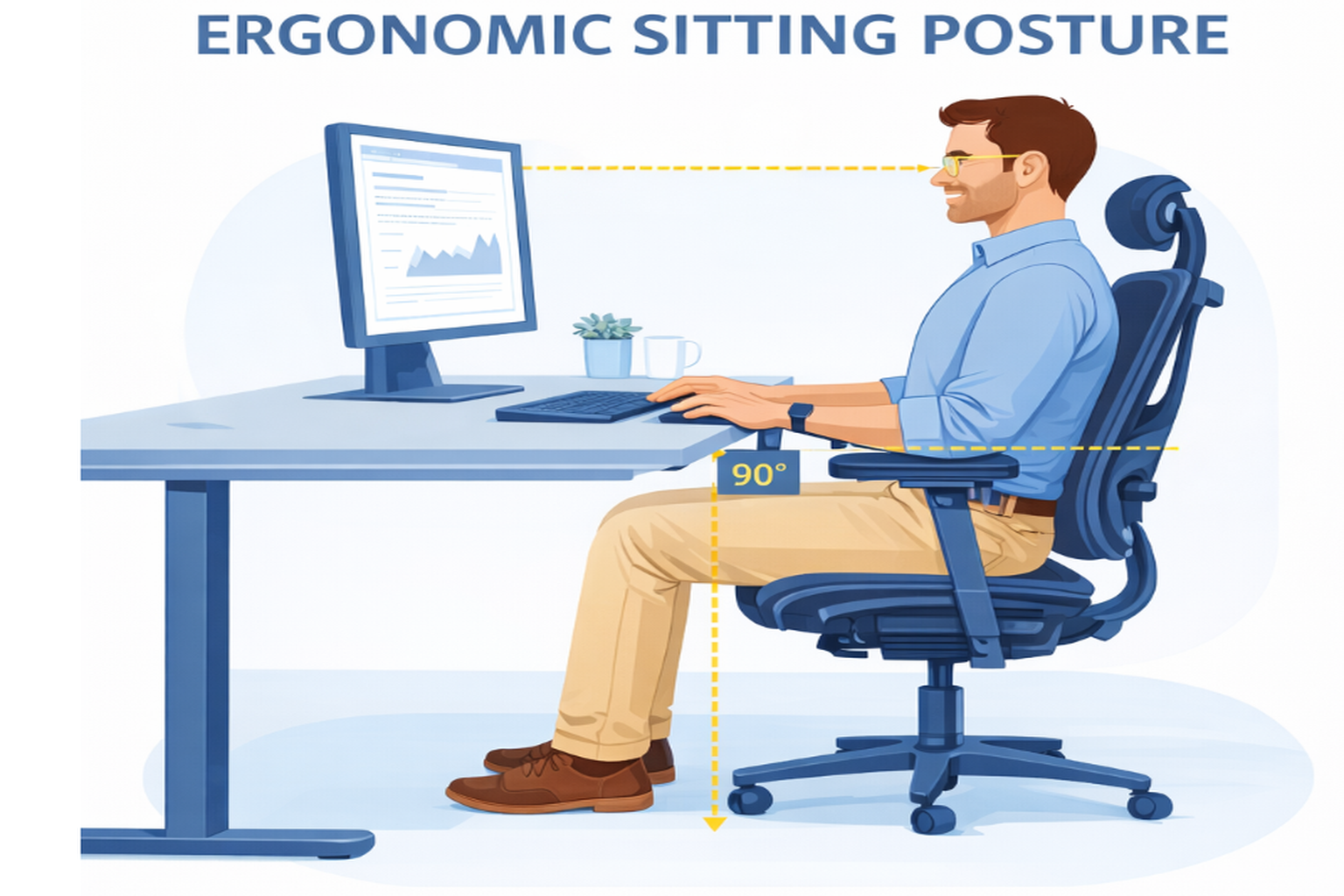
How a person sits and aligns their body
Where the screen is placed and how it is viewed
Typing and mousing position
Support provided by the chair
Movement throughout the day
The goal is not to apply ideal standards. It is to work with what already exists and make it better.
How the Process Unfolds
The structure remains simple, but each step has a purpose.
Initial Understanding
The discussion starts with the nature of work, daily routine, and any discomfort/symptoms already noticed.
Workspace Observation
The ergonomist reviews the current setup through video, images and measurements. Posture, reach, and positioning are observed as tasks are performed.
Identifying Strain Points
Certain issues tend to stand out:
Screen too low/high or too far/close
Desk is too high/low
Chair is too high with no foot support
Chair is too low
Lack of lower back support
Lack of forearm support
Reaching for keyboard/mouse
Maintaining the same posture for prolongued time periods
There are many other issues that can occur that are not listed
Practical Adjustments
Suggestions given by our expert ergonomists are specific and workable. The focus stays on changes that can be made immediately.
Recommendations
Following the ergonomic assessment, a detailed report is provided outlining the current workstation setup, adjustments made during the session, and recommendations for equipment upgrades or modifications that could not be implemented at the time.
Follow-Up When Needed
If something doesn’t feel quite right or symptoms worsen then a follow-up assessment can be helpful to ensure that the equipment is adjusted properly or the proper sized equipment was provided. Our virtual ergonomic assessment stays as close to an in-person assessment as possible.
What It Offers to Teams and Individuals
Teams aren’t working from just one place anymore. When people work in different setups and styles, consistency often becomes difficult to manage. A virtual office ergonomic assessment offers a way to create that structure without being physically present. It is useful for office-based teams in locations where in-person assessments are not practical or cost-effective.
For organizations, it provides:
Access to ergonomic support across locations
Time-efficient evaluations without travel
Early correction of emerging issues
Consistency in work practices
For individuals, the benefit is clarity. The source of discomfort becomes easier to understand. Small corrections often lead to noticeable relief. In locations where onsite assessments can be done, many still opt for a virtual ergonomic assessment because it’s easier to schedule and less disruptive to the workday.
The Role of Injury Prevention Plus
At Injury Prevention Plus, a virtual ergonomic assessment reviews actual working conditions in a variety of work environments. The focus remains on how tasks are performed in real settings.
The approach includes:
Observing individual work patterns
Identifying risks within existing setups
Suggesting adjustments that can be sustained
The aim is to keep recommendations practical for day-to-day work, though some setups may need further action. Virtual ergonomic assessments support remote, hybrid, and office teams, especially when there’s no need for travel.
Small Changes That Shift Comfort
Large upgrades are not always required. Many improvements come from minor adjustments.
Using an external monitor in place of your laptop
Adding a separate keyboard and mouse for better arm position
Adjusting chair height to support a neutral posture
Keeping frequently used items within easy reach
Taking short breaks to reset posture
These changes are often simple but effective. A virtual ergonomic assessment helps identify where they matter most.
Maintaining Comfort Over Time
No work setup stays perfect forever. As jobs change and schedules adjust, the spaces we work in need to keep up too. A virtual ergonomic assessment allows regular review without disruption. It keeps the focus on alignment between the individual and their workspace.
Conclusion
The freedom to work from anywhere is nice, but the discomfort can creep in if your setup isn’t right. Bad posture and long days tend to cause the same kinds of tension wherever you work.
A virtual ergonomic assessment is a simple way to get ahead of that. It helps you spot what’s not working and gives you practical ideas you can actually use and ideas for a better set-up when needed. Even where in-person support is available, many still prefer the simplicity and convenience of a virtual ergonomic assessment.
Injury Prevention Plus keeps things practical and straightforward. Their goal is to help you build a setup that feels good to work in every day.
Frequently Asked Questions
What is a Virtual Ergonomic Assessment?
A Virtual Ergonomic Assessment is a remote review of your workspace, posture, and daily work habits. It focuses on identifying issues in your setup that may be contributing to discomfort over time.
Who should consider a Virtual Ergonomic Assessment?
Anyone working from an office workstation can benefit.
How is a Virtual Ergonomic Assessment conducted?
It is carried out through a video call and shared images and measurements. The ergonomist observes your posture, workspace arrangement, and how you perform tasks, then suggests practical adjustments.
Do I need to change my entire setup after the assessment?
No. A Virtual Ergonomic Assessment focuses on improving what you already have. Most recommendations involve small, manageable changes rather than complete replacements. However, if something that you are working with is contributing to your symptoms the ergonomist may suggest an alternative solution.
What kind of issues can it identify?
It helps identify patterns like poor screen height, lack of back support, lack of forearm support, repetitive reaching, and prolonged static posture that may lead to strain.
How long does a Virtual Ergonomic Assessment take?
Typically, it takes around 45 to 60 minutes, depending on your work setup.
Is a Virtual Ergonomic Assessment suitable for teams?
Yes. It allows organizations to support employees across different locations without needing in-person visits, while maintaining consistency in ergonomic practices.
How soon can improvements be noticed?
In many cases, small adjustments suggested during a Virtual Ergonomic Assessment can lead to noticeable comfort improvements right away.