Our registered ergonomists are ready to help. Call us at (613) 730-1074 or book a consultation today.
AI and Ergonomic Analysis: Where Technology Helps and Where You Still Need a Human Assessor
Nov 14
Introduction
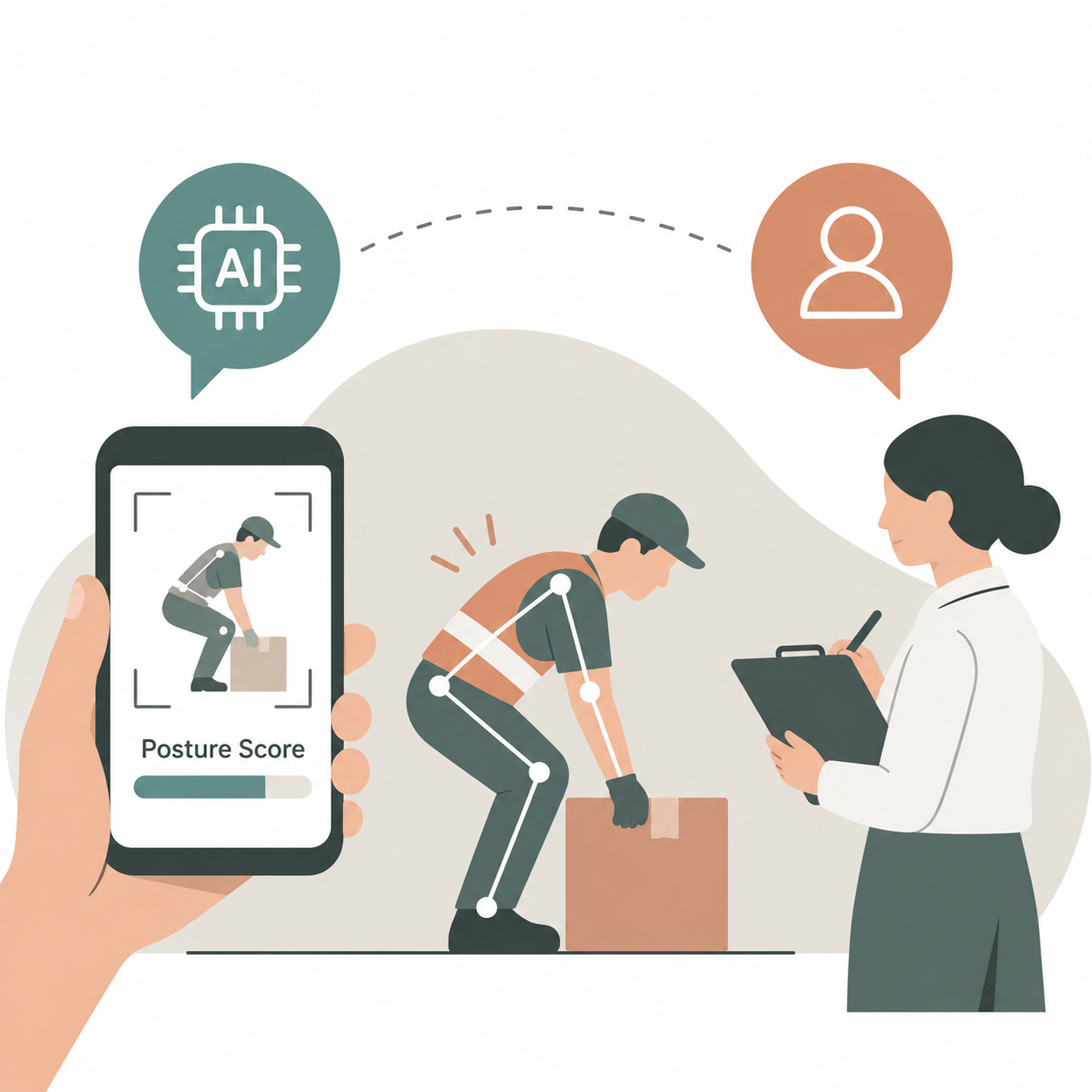
Hold a phone up to someone at work and a few seconds later you have a posture score. It’s real, it’s cheap, and I’ll admit it’s handy. One person with a clipboard could never get through as many tasks.
But a score is a number, and a number can’t tell you why someone is working that way or what should change. That still takes a person’s judgment. Here’s where AI earns its keep in ergonomic analysis, where it falls down, and why you still want a trained assessor when it’s time to decide what to do.
What the camera does well
Under the hood, it’s simpler than it sounds. You film someone doing a task. The software locates their joints, measures how far the neck, back, shoulders and wrists are bent, and gives a score using something like REBA or RULA. Nearly every tool follows that same process. Some also count repetitions and time how long a posture is held.
For a first pass, that’s useful:
- Scanning lots of workstations quickly to see which ones deserve a closer look
- Counting repetitions and cycle times without anyone holding a stopwatch
- Flagging postures that go past a set angle
- Giving hybrid and remote staff a basic check of their setup
- Comparing a task before and after a change
Think of AI-assisted ergonomic analysis as a filter. It points at where to look first. It was never built to tell you what to do next.
What it can’t see
A camera sees a body, and it doesn’t see the job wrapped around that body. The biggest gaps:
- Force and load. Video shows a lifted box. Is it 5 kilograms or 25? How hard are the hands gripping? No idea.
- Contact stress and vibration. A forearm on a hard bench edge looks like nothing on screen. So does a hand on a vibrating tool.
- Pace and recovery. A two-minute clip can’t show hour five of a shift, or whether anyone ever gets a break from the same movement.
- Bad footage. Poor light, an awkward angle, a guard in the way or baggy clothing can all throw the software off.
- What the worker knows. Where it hurts, what they changed to cope, what happened last time. None of that is in the video.
Picture a packer whose wrist angle gets flagged. The software is right to flag it. But why is it happening? The bench might be a few centimetres too low for this person. The tape gun might live on the bottom shelf. The pace target might leave no time to adjust anything. Each cause needs a different fix, and the only way to find the right one is to look at the whole job and ask the person doing it.
Trusting the number too much is the classic mistake. A low score doesn’t clear a task if the camera never picked up the force or the duration, and a high score means little until someone works out the cause. A lot of automated ergonomic analysis stops at posture, while a proper ergonomic risk assessment carried out by a person goes well beyond it.
Virtual ergonomic assessment versus an AI tool
People mix these up because both involve a camera. They’re different things. A virtual ergonomic assessment is a live video session with a registered professional who looks at your real setup and talks it through with you. An AI tool is software scoring what it sees.
What separates the two is where the judgment comes from. A virtual ergonomic assessment puts a trained person on the other end of the call. They watch you work, ask what’s bothering you, and look over the chair, screen and desk you actually use. Hybrid and remote staff get the most out of it, since the home setup is usually half the problem.
One thing before you point a camera at anyone: tell them. What’s being filmed, the reason, who will see the clips, how long they’re stored. Workers who know that tend to be a lot more honest about what hurts.
Why a trained assessor still matters
The score is where the work starts. Somebody still has to decide whether it matters, find the reason, and design a change that fits your site.
Posture, force, repetition, duration and recovery all affect one another. A wrist angle that’s fine for thirty seconds can cause trouble over three hours. That’s basic ergonomic principles at work, and applying them takes someone who understands both bodies and jobs. Software supplies inputs. An assessor weighs them together, and that’s what makes ergonomic analysis something you can act on.
A trained assessor does things no app does. A good assessor starts by asking the worker what hurts and what they’ve already tried. Then they measure force, load, reach and vibration right at the workstation, and they stay for a whole shift, not a short clip. A high score gets traced back to its cause. The recommendations fit the site and the budget, and the written document holds up when return-to-work and accommodation questions come around.
Shop floors and warehouses are where this counts most. An industrial ergonomic assessment covers lifting, pushing, pulling, tools and machine loading. That’s mostly force and repetition, and cameras are poor at both. Somebody has to be standing there with the measuring tools.
A physical demands analysis tells the same story. It records what a job physically requires, which helps with hiring, job matching and return to work in Ontario. That record needs someone who has watched the job being done and will put their name to it.
Good ergonomic analysis ends with a decision about what to change. That decision still belongs to a person.
Conclusion
Let the software screen and track. Let a person judge, find the cause and design the fix. One way to set it up:
- Screen. Use a tool to scan many tasks and spot the worst-looking ones.
- Review. An assessor carries out a proper ergonomic risk assessment on those tasks, on site or over live video, and talks to the people doing them. The ergonomic analysis at this stage is done by a person, not the tool.
- Fix. Make the recommended changes, cheap ones first.
- Re-check. Screen again to see if the numbers moved, then ask workers whether it feels better.
Some organisations hire an ergonomic consultant for this once. Others set up ergonomic consulting over a longer period, so the same person can review what the tools flag, confirm the changes are holding and keep pace as equipment and targets change. Both work, and the ongoing route suits sites where things keep shifting.
The ergonomic principles don’t change with the tools. Reduce force, awkward posture and repetition, and let the body recover. The tools just help you find where to begin.
If you want an ergonomic assessment Toronto teams can rely on, Injury Prevention Plus also works across Ottawa, Gatineau and surrounding regions. A standard ergonomics assessment can be done on site or virtually, and our ergonomic risk assessments cover office, industrial, healthcare, vehicle and field work. Every assessment is carried out by a registered healthcare professional with over 33 years of experience behind the practice.
Book an assessment to find out what your tasks are really asking of your people, whatever the camera says.
Frequently Asked Questions
Can AI replace an ergonomic assessor?
No. AI can speed up ergonomic analysis by screening posture and flagging tasks that look risky, but it can’t measure force, vibration or contact stress, talk to the worker, or work out why a task is causing strain. A full ergonomics assessment by a trained person does those things and decides what to change. The two work best together.
What does AI ergonomic analysis miss?
Mostly the things a camera can’t see: how heavy a load is, how hard someone grips, vibration, pressure on soft tissue, how much recovery the person gets, and the cause behind a posture. Automated ergonomic analysis also depends on good camera angles and lighting.
Is a virtual ergonomic assessment the same as an AI posture tool?
No. A virtual ergonomic assessment is a live video session with a registered professional who observes your setup, asks questions and gives advice specific to you. An AI posture tool is software that scores what the camera captures.
Are AI tools reliable for an industrial ergonomic assessment?
They can help screen a large site and show where to look first. But industrial work is full of force, lifting, pushing, vibration and machine pace, and those need on-site measurement. An industrial ergonomic assessment still needs a person doing the measuring, with the ergonomic analysis built on what they record and not just what a camera sees.
When should I hire an ergonomic consultant instead of relying on software?
When a tool flags a task and you don’t know why, when the same complaints keep coming back, when someone is returning from an injury, or when you’re planning changes to equipment or layout. An ergonomic consultant can also help you decide what to screen, and ongoing ergonomic consulting can check that changes are holding. For an ergonomic assessment Toronto businesses can book, Injury Prevention Plus also serves Ottawa and Gatineau, and carries out ergonomic risk assessments across office, industrial and field settings.